Article
Using Cursor as Your AI-Assisted IDE

March 18, 2026 ...
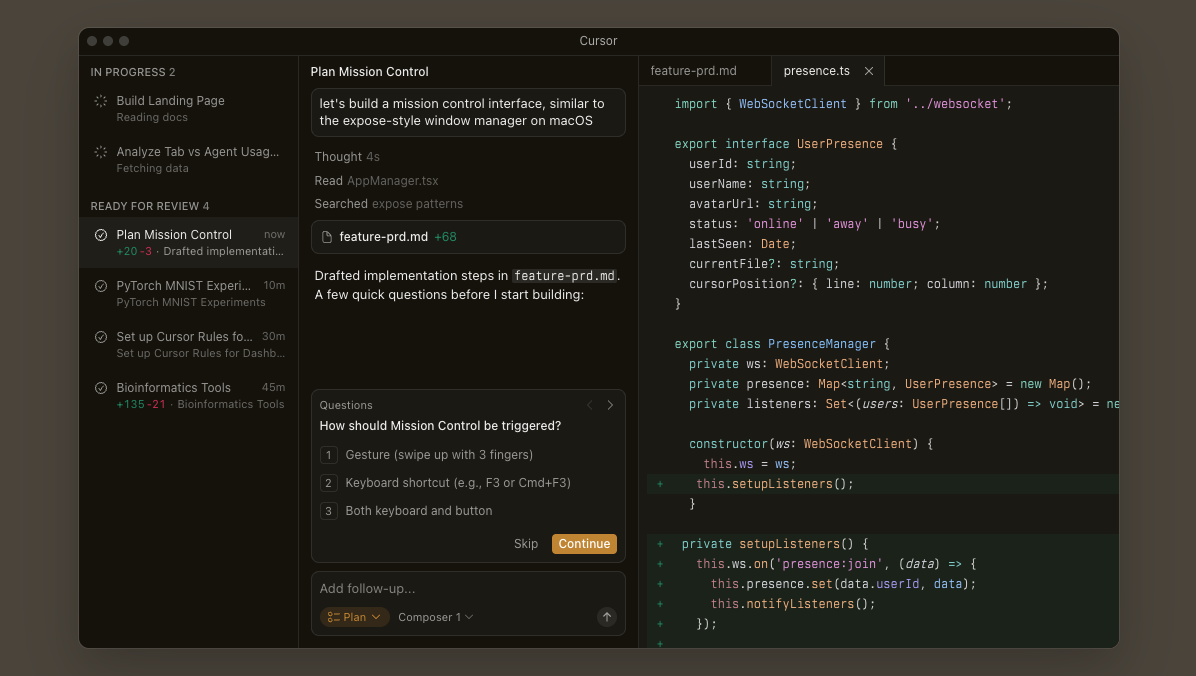
Cursor is one of the first IDEs that actually feels designed for AI-assisted development… not just “VS Code with a chatbot bolted on.”
It’s a fork of VS Code with AI deeply integrated into the workflow: inline edits, contextual chat, multi-file changes, and agent-style assistance that can reason across your codebase. If you haven’t explored it yet, the best place to start is Cursor’s official Features page.
But like any powerful tool, Cursor can either make you dramatically faster… or quietly introduce bugs, tech debt, and bad habits.
Here’s a set of best practices I recommend for using Cursor in real software projects, especially in team environments where quality matters.
Summary
This guide shares practical best practices for using Cursor as a productivity amplifier—not an autopilot—by planning before prompting, breaking work into small, specific tasks, and always providing rich context. It stresses disciplined engineering: test and review AI changes like PRs, commit frequently, and keep a clean, well-structured codebase. Teams should leverage Notepads, Rules, and shared workflows to align output and reduce risk, while exercising extra caution for production-critical systems. Used intentionally, Cursor accelerates learning, debugging, and refactoring without compromising quality.
Use Cursor like an assistant, not a boss
The fastest way to get into trouble with Cursor is treating it like an autopilot.
Cursor is best used like a strong junior engineer or intern:
- It can generate good starting points
- It can unblock you quickly
- It can speed up repetitive tasks
But you’re still responsible for the final output.
Even Cursor’s own team emphasizes the importance of guiding the tool correctly, especially when using agent workflows. Cursor’s Agent Best Practices guide is worth reading because it reinforces this idea: Cursor works best when you steer the intent.
Rule of thumb: if you wouldn’t merge it from a junior dev without reviewing it… don’t merge it from Cursor without reviewing it.
Learn first, then use AI
Cursor can generate code quickly, but it doesn’t replace fundamentals.
If someone is new to a framework or language, Cursor can accidentally create a “copy-paste dependency” where you ship code you don’t fully understand.
A good habit is using Cursor as a learning partner:
- “Explain what this function is doing”
- “What are the risks of this approach?”
- “What would a cleaner architecture look like?”
Codecademy has a solid walkthrough on using Cursor this way in their guide: How to Use Cursor AI.
Plan before prompting
Cursor responds extremely well to structured intent.
Before asking Cursor to build something, do a quick mini-outline:
- What the feature is
- What inputs it expects
- What the output should be
- Key edge cases
- What files or modules should be involved
This is especially important if you’re using Cursor Agents, because agents are designed to take multi-step actions. Cursor’s official Agent Best Practices emphasizes breaking down intent and giving clear constraints.
If you plan first, your prompts become cleaner, and Cursor becomes far more predictable.
Break tasks into steps (Cursor performs better this way)
Cursor is powerful, but large prompts often produce large messes.
Instead of: “Build the whole feature end-to-end”
Try:
- “Generate the TypeScript interface for this API response”
- “Add validation to this function”
- “Refactor this into smaller modules”
- “Write unit tests for these cases”
- “Update this React component to handle loading + error state”
Smaller tasks reduce the risk of hallucinated logic, incorrect assumptions, and untestable output.
This incremental approach is commonly recommended by experienced Cursor users as well. One example writeup that reinforces this workflow is Mastering Cursor IDE: Best Practices.
Be painfully specific in your prompts
Cursor is not magic. It’s a model working from context.
Vague prompts like:
- “Fix this code”
- “Make this better”
- “Optimize this”
Usually lead to unpredictable output.
Better prompts are explicit:
- “Add error handling for null responses”
- “Prevent race conditions when multiple requests happen”
- “Refactor to avoid duplicated logic across these 3 files”
- “Add retry with exponential backoff”
- “Rewrite this to use async/await and avoid nested callbacks”
Cursor’s suggestions become dramatically more useful when the request is tied to a real constraint.
Always provide context (Cursor is a context engine)
Cursor shines when it understands your codebase.
This means your code hygiene directly impacts how good Cursor performs:
- Consistent naming
- Readable folder structure
- Meaningful comments
- Clean separation of concerns
Cursor is designed to use codebase awareness as a core feature, and it becomes obvious when you use it on a clean project vs a messy one. Their Features overview highlights that context-aware behavior is one of its primary strengths.
If your project is disorganized, Cursor becomes less helpful and more error-prone.
Use Notepads for reusable prompts and snippets
Cursor Notepads are underrated.
They’re great for saving:
- “Golden prompts” that work well in your org
- Reusable code snippets
- API patterns
- Logging conventions
- Internal architecture notes
Cursor explicitly promotes Notepads as a way to build reusable workflows and reduce repetition. It’s referenced directly in their Features page.
If you’re on a team, shared Notepads can become a lightweight internal “AI playbook.”
Use Cursor Chat as a debugging partner, not just a generator
Cursor is incredibly useful when you treat it like a debugging rubber duck.
Examples:
- “Why would this function return undefined?”
- “What are the possible causes of this runtime error?”
- “Given this stack trace, what’s the likely failure point?”
- “How would you instrument this code to capture better logs?”
This turns Cursor into a productivity multiplier, because you’re not just generating code… you’re accelerating reasoning.
Test everything Cursor generates (seriously)
AI code generation is fast, but correctness still lives in runtime behavior.
Every time Cursor generates code, treat it like an untrusted change until verified.
Minimum expectations:
- Run the app
- Run unit tests
- Run linting
- Validate edge cases manually
Security teams are increasingly calling this out as a real risk area, because AI-generated code can introduce subtle vulnerabilities. Backslash Security has a strong article on this exact topic: Cursor IDE Security Best Practices.
If you’re working on production code, testing is not optional.
Review AI output like a pull request
Cursor can generate code that looks correct but has issues like:
- Incorrect assumptions about business logic
- Missing error handling
- Inefficient loops
- Leaky abstractions
- Inconsistent naming
- Incomplete cleanup
So always do a full review pass.
A useful mindset is: “Cursor just submitted a PR. I’m the reviewer.”
This alone prevents a lot of long-term tech debt.
Commit changes often (AI makes you move faster than your Git history)
Cursor can produce large diffs quickly, especially with multi-file refactors.
Frequent commits help you:
- Keep changes isolated
- Revert quickly
- Compare before/after behavior
- Avoid losing track of what changed
Cursor can help write commit messages, but make sure commit messages stay meaningful.
If your diff is too big to describe clearly, it’s usually too big to merge safely.
Use Cursor Rules to enforce your team’s style
Cursor supports “rules” that help guide output to match your preferred patterns.
This is especially useful for enforcing:
- Naming conventions
- Preferred libraries
- Error handling expectations
- Architecture rules
- Test requirements
Cursor benefits massively from good engineering practices:
Cursor talks about this concept directly in their agent workflow guidance: Agent Best Practices.
For teams, Cursor Rules are one of the best ways to keep AI assistance consistent across developers.
Keep your codebase clean (Cursor gets smarter when your project is readable)
- Consistent folder structure
- Small, focused functions
- Clean interfaces
- Fewer side effects
- Fewer giant files
This isn’t just “good hygiene.”
It’s AI optimization.
A clean codebase gives Cursor better context windows and clearer intent, which means fewer hallucinations and fewer wrong guesses.
Be extra cautious in production-critical systems
Cursor is fantastic for:
- Bboilerplate
- Test generation
- Refactors
- Documentation scaffolding
- Helper utilities
But when you get into production-critical logic (payments, auth, security, data integrity), you should slow down.
For high-risk systems:
- Review twice
- Test deeply
- Treat AI output as suspicious until proven safe
The security community is already flagging AI coding tools as a growing risk surface, and Cursor is part of that conversation. Again, Backslash Security’s Cursor writeup is a strong reference here.
Keep Cursor updated
Cursor is improving quickly.
New models, new agent capabilities, and workflow improvements ship frequently. Cursor publishes updates and docs regularly, so staying current is worth it. Their official docs are the best place to start: Cursor Docs Quickstart.
If you’re using Cursor in a professional environment, treat updates like you would any developer tool upgrade:
- Update regularly
- Validate workflows
- Share improvements with the team
Share workflows and prompts with other developers
AI productivity isn’t just an individual advantage anymore.
Teams that share:
- Effective prompts
- Cursor Rules
- Reusable Notepads
- Patterns for refactors and testing
…will compound speed and consistency across the organization.
Cursor becomes dramatically more valuable when a team builds shared habits around it.
Take breaks (AI speed can trick you into shipping without thinking)
Cursor can accelerate development so much that you stop thinking as deeply.
That’s the hidden danger.
Sometimes the best thing you can do after generating a chunk of code is:
- Step away
- Come back
- Re-read it like you didn’t write it
Because you didn’t.
Final Thoughts
Cursor is one of the most practical tools today for AI-assisted software development.
But the real advantage doesn’t come from letting Cursor write everything…
It comes from using Cursor to:
- Reduce repetitive work
- Accelerate debugging
- Explore implementation options quickly
- Refactor safely with strong review discipline
When used intentionally, Cursor feels like adding another developer to your team.
When used lazily, Cursor feels like a fast path to tech debt.
Cursor doesn’t replace engineering judgment…
It amplifies it.
Additional References
If you want to go deeper, these are worth bookmarking:
- Cursor Features Overview: cursor.com/features
- Cursor Docs Quickstart: cursor.com/docs/get-started/quickstart
- Cursor Agent Best Practices: cursor.com/blog/agent-best-practices
- Cursor IDE Security Considerations: backslash.security blog
- Practical Cursor Usage Examples: Codecademy Cursor guide
- Example Best Practices Writeup: Medium: Mastering Cursor IDE
Frequently Asked Questions
Question: What makes Cursor different from “VS Code with a chatbot”?
Short answer: Cursor is a VS Code fork with AI built into core workflows—inline edits, contextual chat, multi-file changes, and agent-style assistance that reasons across your codebase. Its strength is context-awareness: it uses your project structure, naming, and files to generate more relevant changes. That integration enables faster refactors, better debugging conversations, and coordinated multi-step edits—but only if you guide it well and keep your codebase clean.
Question: How should I work with Cursor to get reliable results?
Short answer: Treat Cursor like a strong junior engineer you direct. Plan before prompting (define feature, inputs/outputs, edge cases, files), break work into small steps (“add validation,” “write tests,” “refactor module”), be painfully specific about constraints, and always provide rich context. Keep your repo tidy—clear structure, consistent naming, small focused functions—so Cursor can leverage codebase awareness effectively. Commit frequently to keep diffs reviewable and reversible.
Question: What team practices help standardize AI output in Cursor?
Short answer: Use shared Notepads to store “golden prompts,” reusable snippets, API patterns, and conventions; they become a lightweight internal AI playbook. Define Cursor Rules to enforce naming conventions, preferred libraries, error handling, architecture, and test requirements so output is consistent across developers. Share effective workflows and prompts, keep Cursor updated, and review AI changes like PRs to align quality across the team.
Question: How do I reduce risk when merging AI-generated code?
Short answer: Test everything and review rigorously. Run the app, unit tests, and linting; manually validate edge cases. Do a full PR-style review for business logic assumptions, error handling, performance, naming, and cleanup. Be extra cautious for production-critical areas (payments, auth, security, data integrity): review twice and test deeply. Treat AI output as untrusted until proven safe—security guidance highlights that AI code can introduce subtle vulnerabilities.
Question: Besides generating code, how can Cursor help me learn and debug faster?
Short answer: Use Cursor Chat as a learning partner and rubber duck. Ask it to explain functions, compare approaches, surface risks, sketch cleaner architectures, hypothesize root causes for errors, interpret stack traces, and suggest instrumentation or logging. This accelerates understanding and diagnosis, so you ship better code—not just more code—while avoiding “copy‑paste dependency” on outputs you don’t fully grasp.