Article
WebMCP Implementation: Connecting AI to Your Internal Apps

September 9, 2026 ...

AI can help employees prepare work faster. WebMCP could help them complete it inside your internal systems.
A manager uses AI to organize a new employee's onboarding, then opens the purchasing portal and manually searches for a laptop, enters details, and submits a request. AI accelerated the preparation. The administrative work stayed the same.
Your next AI productivity gain may come from connecting the systems employees already use—not adding another chatbot.
What is WebMCP?
WebMCP is a proposed, experimental web standard that lets applications expose specific actions to compatible AI assistants in the browser. Think of it as a menu: what the assistant can do, what information it needs, and what happened when it tried.
Google's WebMCP introduction describes a more explicit alternative to interpreting pages and simulating clicks. For a purchasing portal, supported actions might include searching approved equipment or preparing a request.
WebMCP connects an assistant to existing capabilities. It does not create those capabilities or automatically connect every internal system.
Who is supporting WebMCP?
Support now spans AI, browsers, and application infrastructure—but implementation and ecosystem participation are different:
- OpenAI: ChatGPT desktop site tools use WebMCP in its built-in browser. Availability depends on the account, model, and website tools.
- Google Chrome: An origin trial and experimental flag let developers test WebMCP.
- Cloudflare, Shopify, Vercel, Render, and Netlify: Join OpenAI and Google Chrome as supporters of the WebMCP Challenge. Participation does not mean every supporter's products already offer native integration.
These are the companies named in that announcement, not an exhaustive ecosystem directory. Their involvement makes a focused trial worth considering—not a reason to assume universal compatibility.
Support details checked September 3, 2026. WebMCP remains experimental.
From navigating screens to reviewing work
In a WebMCP-enabled purchasing portal, a company-approved assistant could help the manager:
- Prepare: Search approved equipment and gather missing employee or delivery details.
- Review: Present the equipment, cost center, and request details for the manager to check.
- Submit: Send the confirmed request through the normal approval process.
The portal must still enforce permissions, required fields, approved products, and spending limits. Less navigation should not mean less accountability. Asking AI to follow policy is not a substitute for application controls.
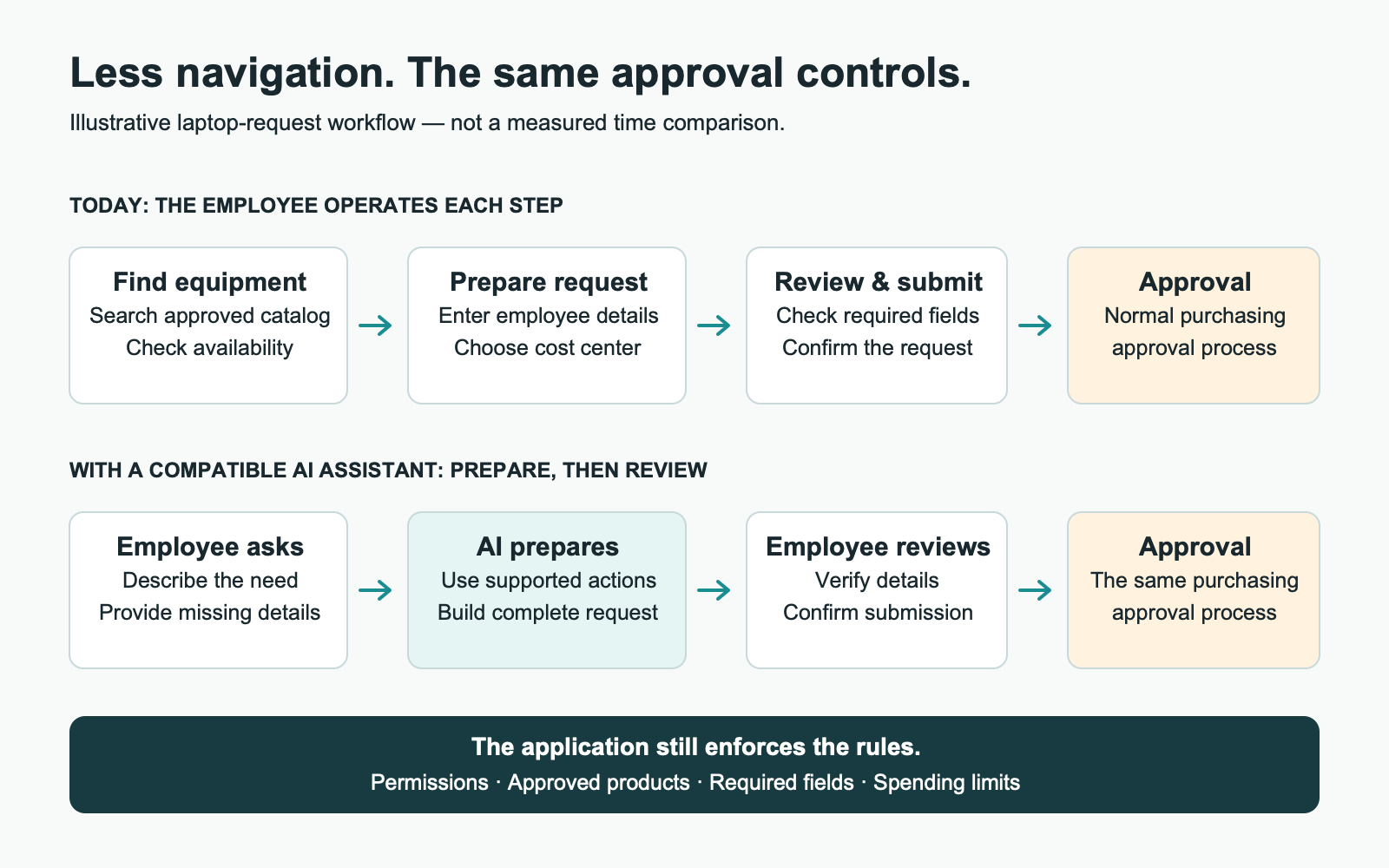
This can complement an embedded assistant. Someone unfamiliar with the portal may need guidance inside it; someone already coordinating onboarding with a shared assistant may prefer to continue there. Both paths should use company-approved tools and the same underlying rules.
Measure the business value, not the demo
A useful pilot should test three potential benefits:
- Less active effort: Measure the entire task, including instructions, review, and corrections—not just the AI response.
- Less rework: Track complete submissions, error rates, and follow-up effort.
- Better use of existing software: Check whether employees need less help completing routine tasks without replacing dependable systems.
Include implementation, security review, training, assistant costs, and maintenance in the business case. Time saved creates capacity; financial value depends on how that capacity improves outcomes.
And be honest about the bottleneck: preparing a request faster will not fix a week-long approval queue.
Choose the right connection
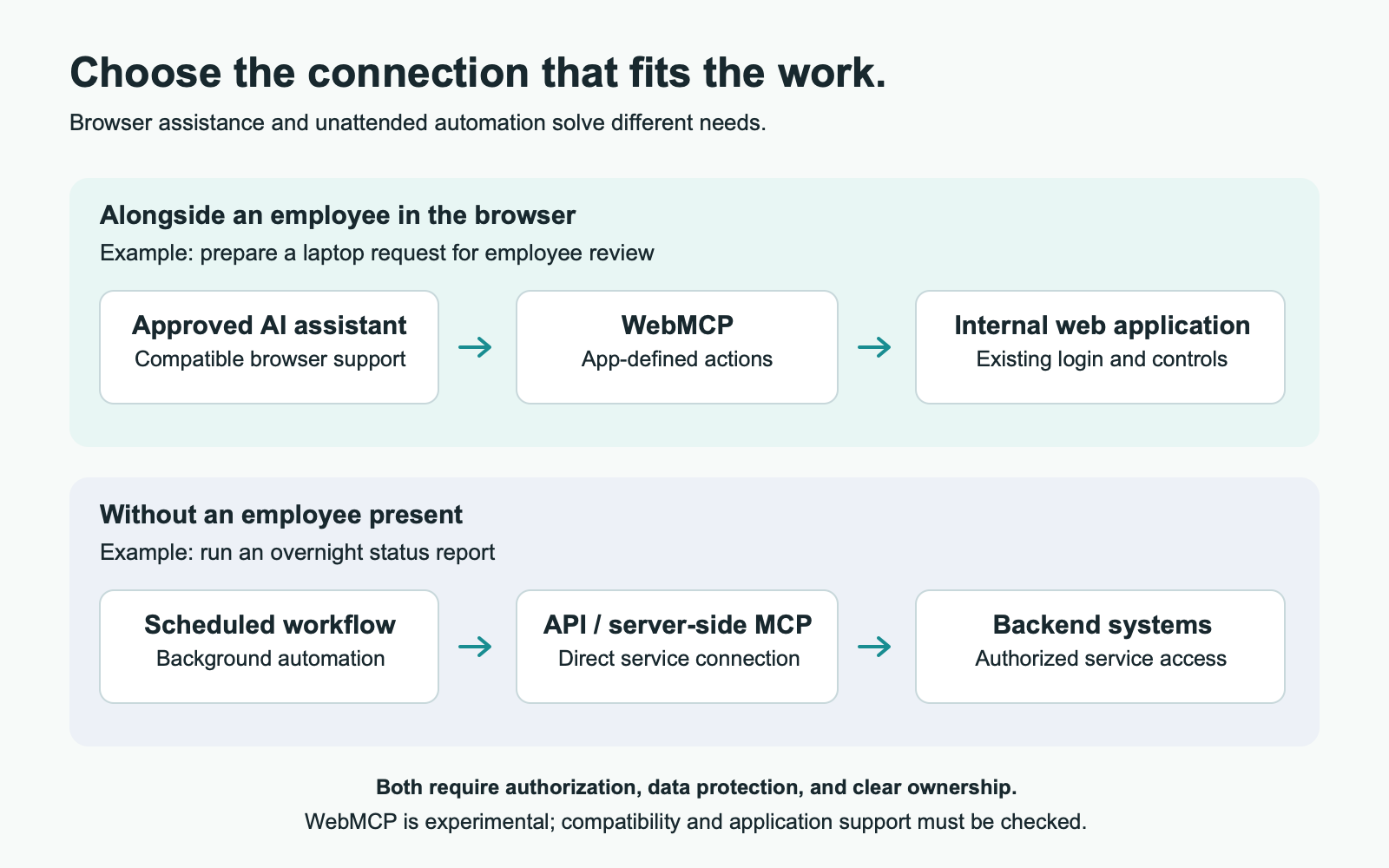
The WebMCP project distinguishes browser-based assistance from direct backend connections:
- Employee working in a browser: Evaluate WebMCP for supported actions alongside the employee.
- Unattended or overnight work: Consider APIs or server-side MCP connections.
Check browser support, network access, login, and data protection before choosing. Third-party applications may also require vendor support or an approved extension point.
Start with one workflow
Bring together the application owner, IT, and employees who regularly do the work:
- Find the friction. Identify repetitive navigation, missing information, and avoidable corrections.
- Test one improvement. Prepare a complete request for review, with safeguards for permissions, interrupted submissions, and duplicate actions.
- Prove the result. Compare completion, employee effort, and downstream handling before expanding.
As we discuss in The AI Prototype Trap, a convincing demonstration still needs reliable systems and operating practices behind it.
Fresh Consulting can help assess workflows, evaluate integration readiness, and build a focused WebMCP implementation with a measurable business outcome.
Your employees already have AI. Talk with Fresh Consulting about connecting it to the systems where work gets done.