Article
Leveraging AI to Accelerate Firmware Unit Testing for C/C++ Microcontrollers

February 19, 2026 ...

The cost of robust firmware unit testing of C/C++ code on microcontrollers is one of the most persistent bottlenecks in embedded development, a time-sink that too often forces critical quality assurance to be delayed or even omitted. While traditional test frameworks and automation tools can handle the setup and boilerplate portions, implementing a truly comprehensive set of unit tests still requires many hours spent manually designing, writing, and debugging test code. This high barrier to entry results in bugs and faults being detected later in the process, driving up costs and eroding product stability.
But what if the time required to develop and implement test cases was compressed from a three-hour manual effort down to one hour?
This article covers:
- A proven, real-world workflow where Artificial Intelligence was leveraged to overcome the firmware unit testing bottleneck for a medium-scale embedded project.
- An exploration into how a custom solution utilizing a modern AI API can analyze C source code and auto-generate C++ unit tests, radically accelerating the workflow.
- The unique challenges of testing embedded software—including the tradeoffs between on-target and off-target testing. Followed by a definition of the specific capabilities and critical limitations of AI in this context.
- A concrete Human-in-the-Loop Playbook for implementation will be presented with a breakdown of the 3-hour to 1-hour turnaround, and a guide for determining the return on investment (ROI) to assist teams in deciding when this AI-accelerated approach makes sense.
The cost of firmware unit testing in embedded software projects
There are plenty of tools and frameworks available for implementing unit tests. So many it’s challenging to select the optimal solution for a project or application. There is a wide range of extensions and other tools available to generate and stub out the individual tests. However, most of them do not offer any way to automate generation of the test content itself. Some simpler or well-defined test criteria can have test code generated, like fuzz or MCDC testing. But more generally, implementing a good set of unit tests requires many hours of programmer’s time spent manually designing and writing test code.
When attempting to test code for an embedded system, it becomes even more difficult and time-consuming. The code can be tested off of the target system, which allows for a more expansive range of test tooling, but at the cost of not being able to check timing or the impact of other hardware-specific properties and behaviors. On the other hand, tests can be run on the target hardware, but this comes with added complexity and extra time to set up the needed test tooling to compile, run, and verify the tests on the hardware. Testing on target also makes automated testing and continuous integration much harder and expensive to use.
As a result, the barrier to entry for firmware unit testing in embedded projects is quite high. Only larger projects or firmware for safety applications tend to use testing. Consequently, bugs and faults are detected later, causing delays, cost overruns, and a less robust product.
What changes when you add AI to the mix
Adding AI to the mix fundamentally changes the cost-benefit equation for firmware unit testing, offering a promising path to significantly reduce the time and cost associated with designing and implementing tests. This section will explore how AI can automate repeatable requirements and generate initial test code, the importance of maintaining a small scope for effective leverage, and the necessary balance between AI-generated code and human review.
Automating repeatable test requirements with AI
Unit test requirements are often fairly repeatable. For example, tests to check corner cases for inputs should be implemented and the requirement can be applied to every function tested.
This set of repeated input requirements can easily be automated and fed into an AI along with the source code to test. This automation of the AI prompts allows fast and cheap generation of not just the test stubs, but also a first draft of the test code.
Keeping the scope small for the best results
The key is to have the context and scope small enough that the AI can perform the complex analysis needed to design the tests and then correctly implement them. Too large a scope and current AI systems make too many mistakes that need to be fixed with human input, reducing or eliminating the productivity improvement.
The AI makes more mistakes the larger and more complex the tested source code is. Simple 10-line or less functions often don’t require any fixes to the AI-generated code. Up to about 100 lines of code with moderate cyclomatic complexity (up to about 20) is still effectively handled by current AI. Larger and/or more complex code, and the AI starts to make a lot of mistakes and requires significant input from a developer to review and fix.
Balancing AI efficiency with human oversight
Reviewing and debugging the AI-generated test code is significantly faster than having a developer write it and then debug it. Despite this efficiency gain, current AI systems are not accurate enough to correctly generate all test code needed; thus, some review and editing by a developer is required to have useful and reliable tests.
In summary:
- AI offers a promising path to significantly reduce the time and cost associated with designing and implementing unit tests by automating repeatable requirements and generating initial test code.
- The key to effectively leveraging this technology lies in maintaining a small, manageable scope, as current AI performance degrades rapidly with larger and more complex source code.
- While the generated test code still requires human review and refinement, the efficiency gain over fully manual test development and execution makes AI a valuable tool for improving the overall speed and reliability of the testing process.
A human‑in‑the‑loop playbook for AI‑generated unit tests
The general workflow for implementing firmware unit testing and leveraging AI for code generation is as follows:
- Define test criteria
- Decide if on-target, off-target, or a mix is the right choice for the criteria
- Choose and setup test framework
- Create prompt(s) for AI to generate unit tests to meet the criteria
- Test and refine prompts
- Generate unit tests
- Manually review and adjust test code
- Use tests
The main differences between a more traditional workflow and this AI-enhanced one are:
- Tailoring test criteria to be processed by the AI
- Generating the AI prompt and iterating on it
- Reviewing the AI output for correctness and making fixes
The following sections expand on each of these.
Tailoring test criteria
To feed the test criteria into the AI, all that is needed is for them to be in a plain text format. Some AI’s can handle PDFs and other documents as well, so even that may not be needed.
However, the AI does not have any institutional knowledge, so the test criteria need to be spelled out in detail, including desired formatting, in order to get consistent results that are in line with best practices. Generally, the more detailed and specific the requirements are the better the results you will be able to obtain from the AI.
If you need to pass in specific requirements for each unit tested, that is also relatively easy to do with the available AI APIs. However, it will need to be documented in a format the AI can understand and also tied to the unit it applies to so that the correct unit requirements can be passed to the AI.
The importance of clear, accurate AI prompts
Current AI systems are significantly influenced by the quality of the input data and instructions (“garbage in, garbage out“). Vague or simplistic prompts often yield inconsistent and low-quality output. Therefore, providing detailed and specific instructions to the AI is crucial for optimal results. This process is analogous to creating a comprehensive work instruction. For instance, instructing someone to change a tire requires more than simply stating, “remove the flat and install the spare”; a step-by-step, specific process is necessary for successful execution. Similarly, AI requires explicit, structured instructions to generate the desired high-quality outcomes.
Iterative prompts are even better than a single detailed prompt. For example, breaking a prompt to write tests to perform modified decision/condition coverage into four steps will frequently result in better AI-generated test code:
- Identify all the decision points in <function to test>
- Using the decision points you identified, write a set of unit tests that perform MC/DC testing
- Evaluate which decision points are covered by the MC/DC tests you wrote
- Are there any decision points not fully tested? If so, write additional tests to cover those.
In addition to clear instructions, the AI also doesn’t know its role, and there is a big difference in the expected response if the AI is trying to be a painter attempting to understand C source code or an expert software developer. Thus, explicitly telling the AI what its role is will help ensure the AI acts appropriately in response to your instructions, causing it to more consistently provide the desired type and quality of output.
Reviewing AI output
Modern AI is far from perfect. Even with generating tests for easy-to-moderate source code, an AI will still make mistakes or, more often, incorrect assumptions. The AI-generated code needs to be reviewed by a human to ensure it is fit for purpose. However, reviewing and fixing code that is 95% of the way to done is much faster than writing the test code from scratch. The generated tests need the review, but there is still significant time savings to be had by leveraging an AI to write the first draft of the tests.
The anatomy of a 3‑hour to 1-hour turnaround
To provide a more concrete example of these steps, the approach of using Google Test and Google Mock to run tests under Linux (off target) for an ARM MCU will be examined. This setup was recently used with good success on a moderately sized embedded project.
Sample source code under test
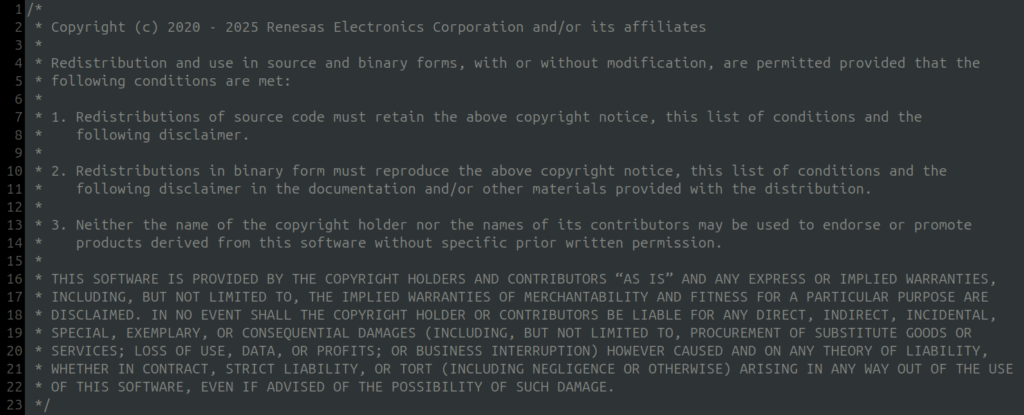
Below is an excerpt of Renesas’ FSP driver library for one of their ARM microcontrollers. For this example, the goal is to have the AI write some unit test cases for the crc_seed_value_update function. This function updates the CRC seed value used for the hardware CRC module.
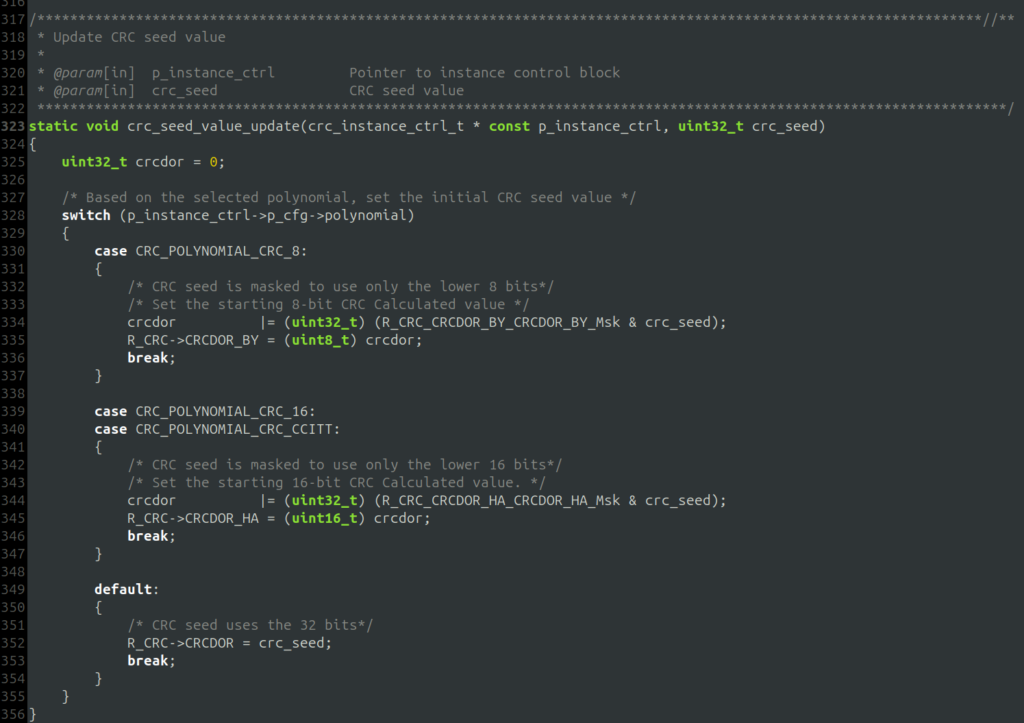
One of the challenges with testing this code is that the unit test will not be running on the target hardware, and thus, the registers don’t exist on the test system. Attempting to write to a register directly will result in a segmentation fault. One general solution to HW registers is through using the build environment to replace the fixed addresses for the registers with allocated memory in RAM. In this specific case R_CRC will be a pointer to a struct.
Requirements specification
The next step is to develop a set of requirements for the AI to follow when creating the unit tests for the source code. Below is an example requirements specification for use with a simple single stage AI prompt.
Note that even though this is a relatively simple example, the requirements are very detailed and specific. The more clearly the desired output is described, the better the AI will do at meeting the desired requirements. Better results could be obtained by breaking the AI prompt down into several request-reply transactions with the AI.
Unit tests will be written using C++ using the google test and google mock libraries. crc_seed_value_update is the function to be tested.

crc_seed_value_update must have a set of unit tests (TEST_F implementations) that:
  1) Exercises each code path and checks for correct operation. 100% statement and branch coverage is desired.
  2) Inputs invalid or bad values and verifies crc_seed_value_update detects and gracefully handles the bad input.
  3) Uses the Google mock interface provided to verify all function calls made outside the source file containing crc_seed_value_update are made correctly.
  4) Uses the Google mock interface provided to have function calls return bad values or errors. The test(s) will verify crc_seed_value_update detects
     and handles the bad return values.
  5) Any mathematical operations must be tested for correctness.
  6) Checks pointer assignments within crc_seed_value_update are correct and valid when possible.

At the beginning of your code. Create a comment block that maps each TEST_F back to the above requirements list. For each requirement, list all the TEST_F that
are used to satisfy the requirement. Also, in the list of TEST_F, give a short description of how the TEST_F meets the requirement. For example:
<Tests used to satisfy requirement 1:
    DIO0_IRQHandler_IgnoresInterruptWhenIgnoreFlagSet - checks the code path with IgnoreFlag set.
    DIO0_IRQHandler_ButtonPressedTogglesStatusFromZero - checks the code paths when IgnoreFlag is not set.>

Each unit test must:
  1) Test only a single condition.
  2) Use the TEST_F macro for Google Test to implement the test.
  3) Have a name of the format crc_seed_value_update'_[operation_tested]" where the [operation_tested] is changed to describe what the TEST_F is testing.

Each TEST_F must have a comment block explaining:
  1) What the test is checking about crc_seed_value_update’s operation.
  2) What is being verified by the test.
  3) List the inputs to and expected outputs from the crc_seed_value_update. In this context, outputs include calls to the mocked functions as well as the values returned from crc_seed_value_update.
  4) Use the provided test fixture. This fixture is named Src_RCrc_RCrcCTest. See the provided source code for details.
  5) The comment block should use the following format:
     ```
     /** <test_name>
      *
      *  <description of what's being tested. e.g. This test verifies crc_seed_value_update detects when
      *   param1 is too large.>
      *
      *  Expected Results:
      *      <Description of result e.g. Function detects <some input> is out of range and returns NULL>
      *
      *  Test Conditions
      *  ---------------
      *  Starting Global Variable Values:
      *      <List the global variables used for this test and what their initial values are set to.
      *      e.g.
      *      GlobalVar1 = 1234>
      *
      *  Function inputs:
      *      <List the values passed to crc_seed_value_update and the expected return values. Make one entry per call
      *      to crc_seed_value_update in the test.
      *      e.g. for two calls to a hypothetical function under test that takes 2 integers as inputs and returns a float:
      *      function_name(1234, 5678) -> 2345.0
      *      function_name(   0,    1) -> 1.23>
      *
      *  Called Functions and Returned Values:
      *      <List each function thatcrc_seed_value_update is expected to call. One entry per call to a function
      *      there will be more than one entry for a function if said function is called more than once.
      *      e.g.
      *      CalledFunction1(value1, value2)  -> 1234
      *      CalledFunction2("input string"") -> "Returned string"
      *      CalledFunction1(value3, value4)  -> 4321>
      */
      TEST_F(<fixture_name>,<test_name>)
     ```
Sample AI-generated unit test code
The above requirements and source code were run through Anthropic’s Claude AI. Below is an excerpt of the AI’s output containing a single test case for crc_seed_value_update.
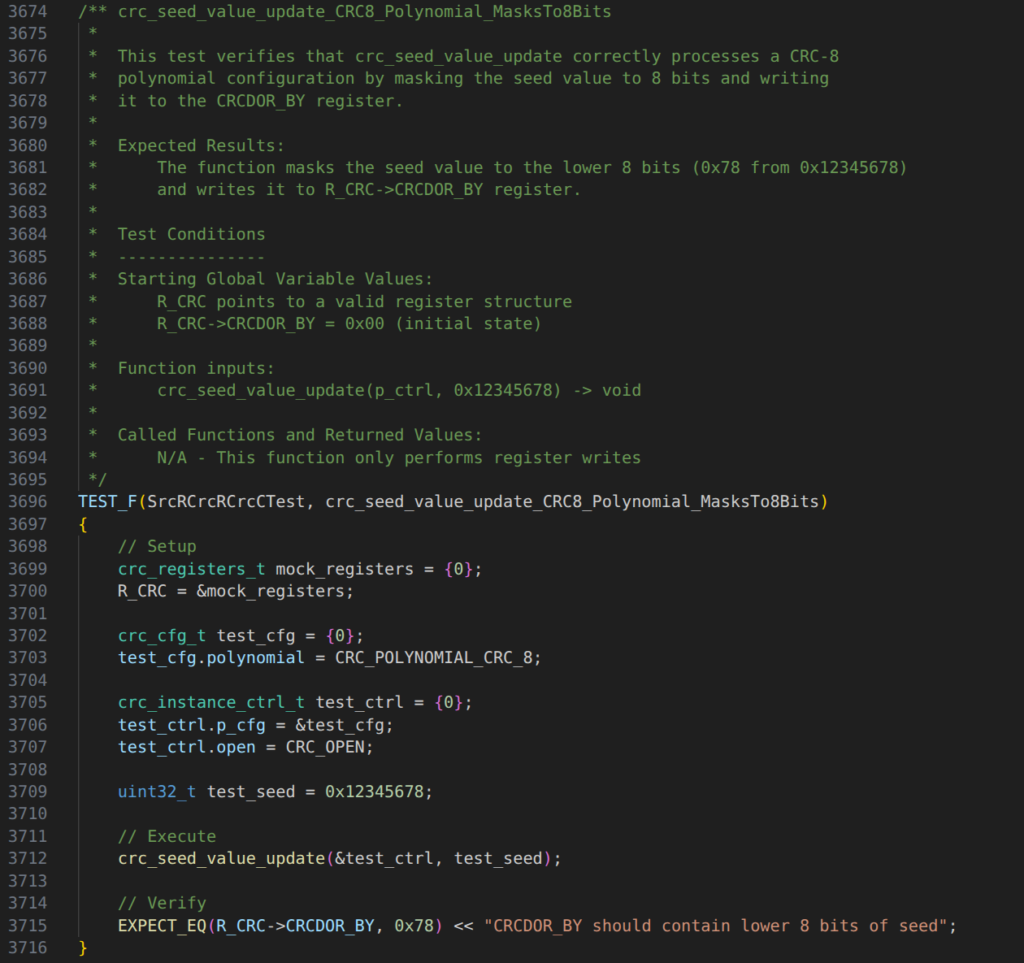
Some observations to note in the output:
- The comment block format closely follows the one provided in the requirements text. Being that specific is needed to have the AI generate consistent output for it.
- The AI successfully creates and assigns a structure in memory to replace the hardcoded R_CRC register address. However, the structure is created on the stack, and the pointer in R_CRC is left by the AI after the test runs. This is not good practice, but it is easy to adjust the prompt to force the AI to follow a better practice.
- Initial conditions are set correctly by the AI and the test design successfully checks the CRC_POLYNOMIAL_CRC_8 path through the switch.
- The AI successfully generated a decent unit test for a low complexity function. Some minor adjustments could be made either in the prompt or by a human reviewer to improve the test design to meet best practices.
The AI generated many more test cases for this function and all the other functions in the same Renesas driver file. It only took the AI about 10 minutes and 80 cents worth of usage to generate 6000 lines of C++ code and comments. Writing an equivalent set of unit tests by hand would take many hours.
In general, the productivity enhancement from AI generation and human review compared with manually authoring tests from stubbs was found to be about 3x.
In other words, 3 hours of work can be reduced to one hour. With the more capable AIs in the future and more refinement to the unit test generation scripts this ratio will continue to improve dramatically.
Risk management and safety‑critical considerations
The AI-assisted unit test generation presented can be used for safety-critical applications like medical devices or avionics. A human must always be in the loop to review the generated code for correctness and to ensure it is fit for purpose. As such, the AI-generated unit tests are not substantially different from using another tool to generate the test stubs. A human still reviews, updates, and signs off on the final output.
One key difference between standard software development and development for medical or other safety-rated software is that the definition of a unit is different. For example, IEC 62304 defines a unit as a “software item that is not subdivided into other items”, but this is referencing the software design and not the code itself. Thus, a unit often consists of a logical grouping of functions and is not just a single function as is often the definition in standard software development. Because current AI systems struggle with more complex and larger pieces of software, use of the AI needs to be taken into consideration at design time to ensure that:
- The units identified in the design are of small enough scope that the complexity is not too high for an AI to effectively write tests for them.
- The test methodology used for firmware unit testing allows for groupings of code to be tested that are AI appropriate (about 100 LOC or less). For example, incrementally testing the functions in a call tree within a single module to test the whole tree.
The ROI—and scenarios where AI makes sense
For any engineering process change, the return on investment (ROI) must be clearly established. AI-assisted unit test generation represents a significant acceleration of the development workflow, but it also carries associated costs that must be managed.
The investment for this approach is relatively small but essential:
- Setup Time: Time must be allocated to create the foundational automation, such as the initial Python scripts and environment configuration.
- Prompt Engineering: Developers must dedicate time to creating, testing, and refining the iterative prompts necessary to achieve a high-quality first draft of the test code.
- Correction Overhead: An engineer remains the final human-in-the-loop, requiring time to review the AI’s output and correct any egregious mistakes or incorrect assumptions that inevitably occur.
- AI Service Cost: The operational expenses to use the AI API is typically minimal overall in the project budget, so cost avoidance at the project management level is supported.
In contrast, the gains realized are substantial, typically yielding a net positive ROI, particularly for larger or long-running projects:
- Time Reduction: The primary benefit is a massive reduction in programmer time required for writing tests, often achieving a 3x speed up over manual testing and development for functions well-suited to the AI’s strengths.
- Productivity and Quality: This acceleration also leads to a reduction in context switching for developers, allowing them to focus on higher-value architectural work. Furthermore, the systematic nature of the AI-generated tests, once the prompts are tuned, can lead to higher overall quality and consistency of test design.
This approach is not a universal fit, and its limits must be considered. AI-assisted firmware unit testing offers the best return when deployed on:
- New Development & Scale: If the AI generator is already established, it should be used almost without exception on any new development project, as the marginal cost of use is extremely low. For projects where the tooling is not yet in place, the scale must be medium to large to justify the upfront investment in setting up the AI generation framework.
- Existing Codebases: It provides an efficient path to quickly add tests to an existing codebase, especially if significant work is being performed on that code.
- Limits: The technology provides diminished returns for complex software or for poorly written code with long, complicated functions. Furthermore, extremely small teams or projects with highly constrained target hardware or intricate hardware interactions may see different or insufficient gains to justify the initial setup cost.
The evolving role of the QA engineer
Using AI for firmware unit testing has been shown to achieve at least a 3x productivity speedup over manual test code authoring. Furthermore, this multiplication of human effort will only improve as the tools and AI advance. The caveat is that leveraging AI fundamentally changes how humans are involved in the authoring of code and the associated workflow they need to perform. These changes to workflow introduce new and different challenges with the focus shifting to how to provide effective input to an AI and how to minimise the amount of human intervention needed in correcting the AI’s outputs.
While these challenges are manageable, following the presented playbook for human-in-the-loop AI-generated unit tests can effectively address them and realize at least a 3x acceleration in your test workflow.
Are you performing firmware unit testing or other time-intensive software QA and need assistance? Don’t hesitate to reach out. Our team is here to help, whether we explore automation via AI or take a traditional path.